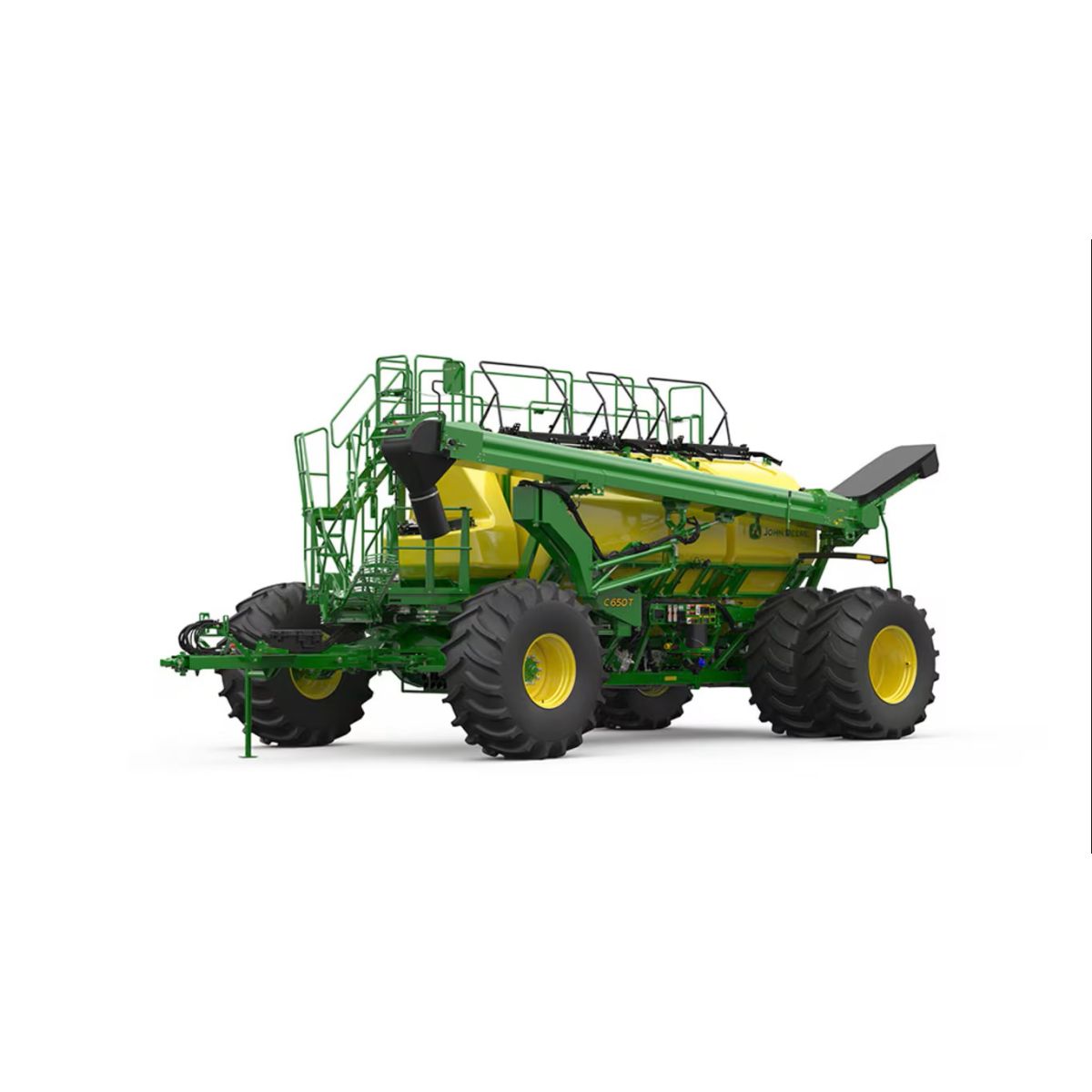
C650T
Trailing Air Cart
- 22.9-cu m (650-bushel) capacity trailing cart
- Seed up to eight times1 more precisely with the new AccuRate™ stainless steel electric meters
- Calibrate 45% faster2 than leading competitor calibration times with industry exclusive EZCal™ system
- Calibrate from the cab with ActiveCal™ and improve seeding confidence and productivity with tank scales
Features
The Total Seeding Solution – experience the John Deere advantage
John Deere has the seeding solutions that go above expectations with a complete line of everything needed in small grains. Offering a variety of openers for your chosen practice in a variety of configurations and sizes. All with integrated technology throughout the seeding train allows for effortless setup and seamless documentation.
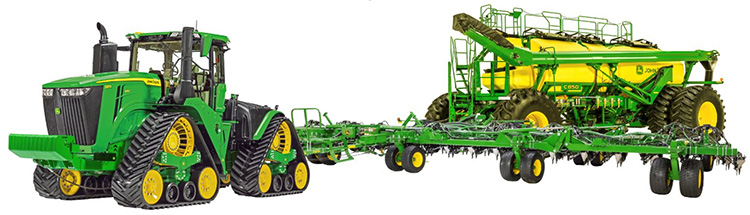 Total seeding solution
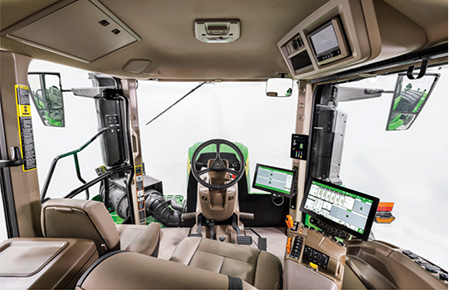
 Setting up a John Deere seeding train is quick and easy with the plug and play technology. All data and technology operate through the Gen 4 display and ultimately up to John Deere Operation Center™ that can be viewed from anywhere at any time. Not only does the complete John Deere seeding solution all operate through one display but it eliminates the difficulty and time-consuming tasks of setting up extra displays and harnesses.
 John Deere tractor paired with John Deere tool and cart
 With a complete John Deere seeding solution, there are multiple different onboard and offboard technologies shown below that improve the overall seeding production step. Many of these technologies are exclusive to John Deere. Each of these technologies bring different customer value that overall lead to the ultimate John Deere seeding solution!
Improve confidence and while reducing maintenance with the new AccuRate™ metering system
- Combination of stainless steel and composite materials ensure an entire corrosion resistant system
- Individual electric meters allowing for more precise seeding
- Up to 8x more accurate prescriptions with high fidelity prescription
- Start and stop each meter with SectionCommand™ Pro
- Accurately meter the correct amount of product on a curve with curve compensation
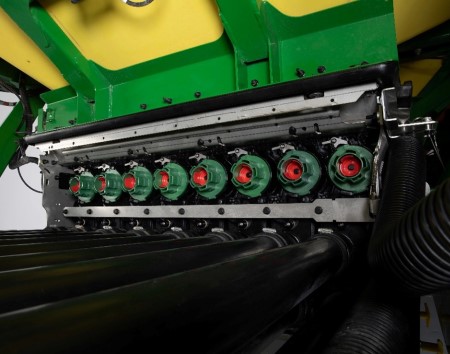 AccuRate™ meters showing eight individual sections
 Calibrate faster and easier than ever before with EZCal™
- Easily calibrate from the side of the cart with the click of a few buttons 45% faster than the leading competitor
- Automatically weigh product and update MDV values eliminating potential user error
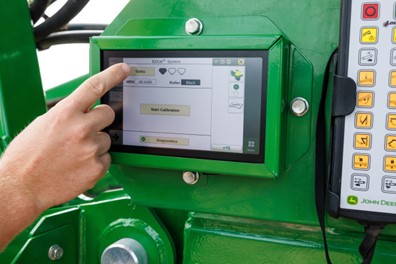 G5e Cart Side Display
 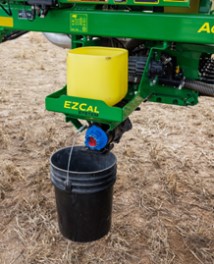 EZCal™ system
 ActiveCal™ display Calibrate more frequently from the seat of the cab with ActiveCal™
- Calibrate the meters from the cab utilizing the tank scales
- Improved confidence that the correct seeding rates are being met
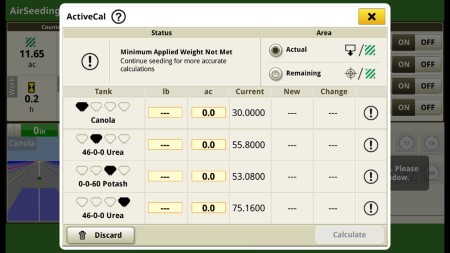 ActiveCal™ display
 Save input cost with SectionCommand™Pro
- Control seed and fertilizer output by starting and stopping each individual meter section
- Eliminate skips and overlaps leading to reduced inputs and higher yields
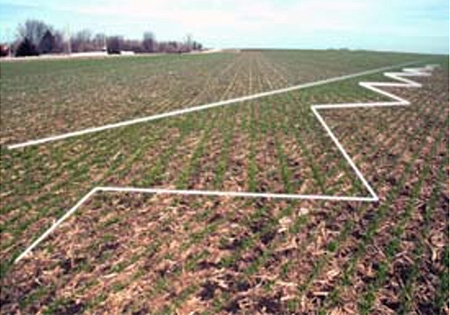 Example of seeded field with SectionCommand™ Pro
 On the go, quick adjust downforce with TruSet™ from the cab
- Adjust downforce pressure to improve uniform emergence
- Set presets to quickly adjust from field to field
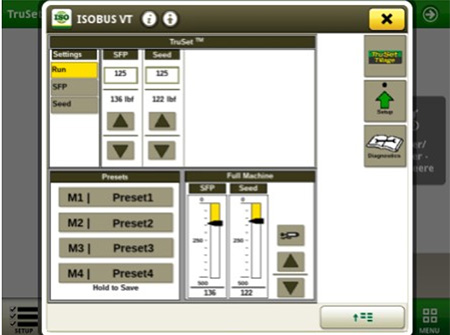 TruSet downforce display
 Monitor blockage row by row from the cab with RelativeFlow™
- Seed with confidence while monitoring each row
- Detect blockage early and know exactly where it is
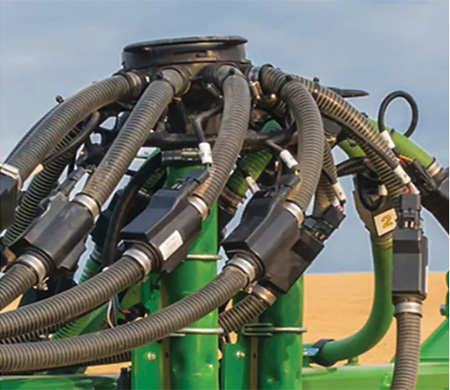 RelativeFlow blockage sensors
 AutoTrac™ Implement Guidance and AutoTrac Turn Automation
- Make every operator an experienced operator
- Precisely placed implements for more accurate seeding, less operator fatigue, and more productivity
- Hands-free turns within field headlands (with AutoTrac Turn Automation enabled)
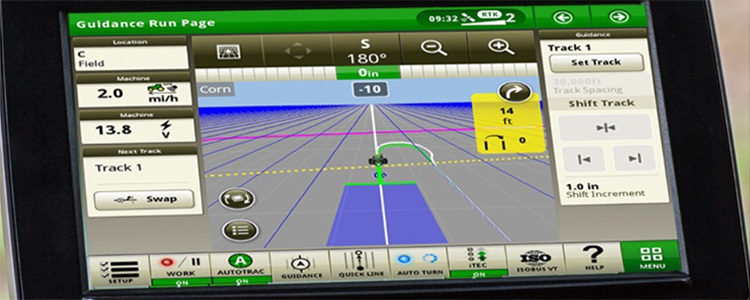 AutoTrac Turn Automation display
 John Deere Operation Center™
- Setup and manage your farm operations: equipment, team, fields, and crop inputs
- Plan work in advance to increase job quality and efficiency with Work Planner
- Map based prescriptions can be used with variable rates
- Analyze this season’s results to improve next season’s crops
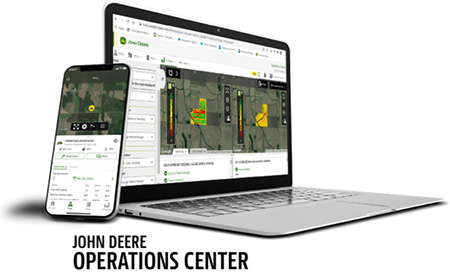 John Deere Operation Center web and mobile
 Operation Center Mobile
- View your data on the go; remotely monitor job quality, productivity, machine performance, and quickly make informed decisions
- Manage and monitor from anywhere at any time with near real-time field and machine updates
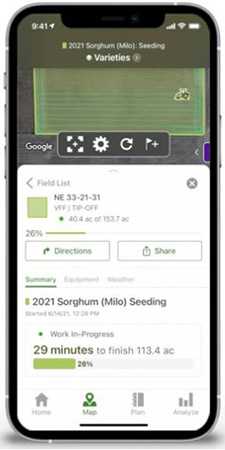 Operation Center Mobile
 Connected Support
- Expert Alerts proactively notifies your dealer of any issues
- Remote display access allows for easy on the go support
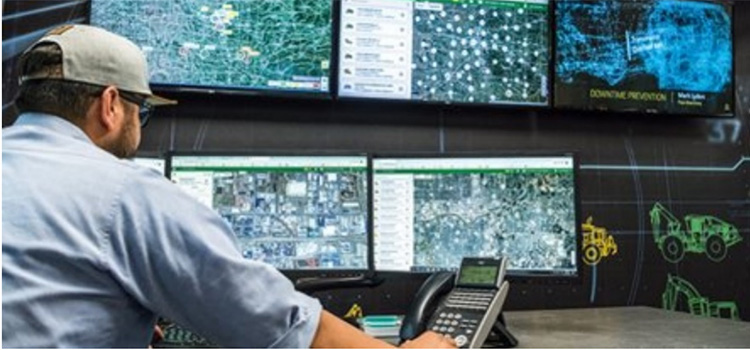 Connected Support
 For more information regarding Large Tractors and Precision Ag, view the following landing pages
New C-Series Air Cart lineup ensures confidence while improving reliability
 Model year 2025 C- Series Air Cart Leading Models
  Model year 2025 C- Series Air Cart Trailing Models
 New for model year 2025 John Deere offers a complete redesign to the air car lineup to meet your needs. The C-Series Air Cart lineup offers an all new metering system with the AccuRate™ Meters that improve the accuracy and confidence while seeding. In addition to AccuRate™ Meters, the C-Series Air Cart consists of a frame up design replacing the 1910 Air Carts which brings tank scales and ActiveCal™ to the entire lineup.
- Seed accurately with the new AccuRate™ Meters
- Minimize maintenance cost with stainless steel corrosion resistant meter bank
- Individual electric controlled meters on each primary allows for more accurate metering
- Enabling curve compensation, high fidelity prescriptions, and SectionCommand™ Pro
- Calibrate faster and easier than ever before with the EZCal™ System
- 45% faster* calibration than leading competitors
- *NOTE: Based off internal testing of a Bourgault air cart calibration taking 4 minutes compared to a new C-Series air cart taking 2 minutes and 15 seconds.
- Eliminate potential user error with the push of a button through the automated scale
- Easily transfer the updated Meter Displacement Value (MDV) from the G5e Cart Side Display to your Gen4 or G5 display
- 45% faster* calibration than leading competitors
- Improve seeding confidence with tank scale available on all cart sizes
- Calibrate from the cab with ActiveCal™
- Know the exact amount of product in each tank at all time
- View tank weights when filling product with the G5e Cart Side Display
With all the new features coming to the C-Series Air Cart lineup the model numbers were also updated. Now customers will be able to easily identify the cart size through the model number. Not only is the bushel size in the model number, we also included an “L” or “T” to identify if the cart is in the leading or trailing configuration of the seeding train.
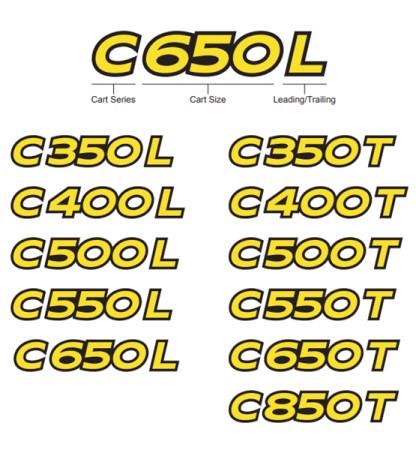 New model numbers for the C-Series Air Carts
 The C-Series Air Cart lineup is available in multiple cart sizes ranging from 350 bushel to 850 bushels. All carts are available in leading or trailing configuration except the C850T. You have choices for the right configuration for your farm’s needs.
MODEL | CAPACITY | Tank Splits |
C350L C350T | 350 bu | 160 bu. 190 bu. |
C400L C400T | 400 bu | 50 bu. 160 bu. 190 bu. |
C500L C500T | 500 bu | 190 bu. 90 bu. 220 bu. |
C550L C550T
| 550 bu. | 50 bu. 190 bu. 90 bu. 220 bu. |
C650L C650T | 650 bu. | 50 bu. 260 bu. 130 bu. 410 bu. |
C850T
| 850 bu. | 50 bu. 260 bu. 130 bu. 410 bu. |
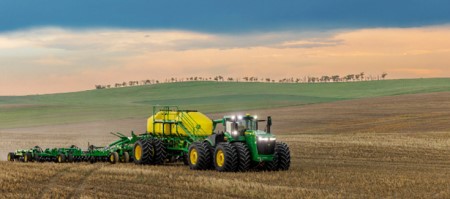 C500L Air Cart with N560 No-Till Air Drill
 Elevate your seeding experience with effortless setup using the C-Series Air Cart
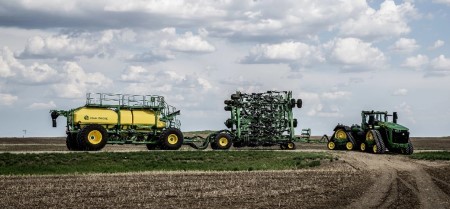 9RX 830 paired with the P680 Precision Hoe Drill and the C850T Air Cart
 Setting up seeding with C-Series Air Carts is effortless and efficient, thanks to the plug and play technology. The John Deere Operations Center™ integration offers seamless data management and planning, optimizing seeding operations. Work Planner simplifies task organization for smooth field execution. Additionally, color-coded hoses provide visual guidance, enhancing user-friendliness during setup between the cart, tool, and tractor. The introduction of EZCal revolutionizes the calibration process, ensuring precise seeding operations with unmatched convenience and speed. Together, these features streamline the user experience, making seeding setup simple and efficient, getting you to the field sooner than ever before.
- Operations Center Integration:
- Centralized Data Management: Seamlessly manage and analyze all seeding-related data in one location.
- Planning Efficiency: Plan and optimize seeding operations with ease, leveraging precise data insights for informed decision-making.
- Work Planner:
- Task Organization: Simplify task organization and execution for seamless operations in the field.
- Enhanced Efficiency: Streamline work processes and maximize productivity with advanced planning tools.
- Seamless Data Integration: With Work Planner, the correct field, boundaries, implements, machines, seeding rates, and prescriptions automatically populate onto the Gen4 or G5 display when pulling into the field.
- Color-Coded Aluminum Hydraulic Hose Grips:
- Visual Guidance: Simplify setup and maintenance with color-coded hose grips, providing clear visual cues for efficient and error-free setup between cart, tool, and tractor.
- Reduced Errors: Minimize the risk of mistakes and improve operational accuracy with easily identifiable hoses ensuring they are in the proper selective control valve (SCV).
- Display Setup:
- Streamlined Display Setup: Simplified display setup, offering an intuitive and user-friendly interface that ensures quick and efficient configuration.
- Clean and Simple Cab Setup: The plug-and-play technology ensures a clean and clutter-free cab environment, allowing for straightforward display setup without the need for complex wiring or additional clutter.
- EZCal Calibration System:
- Simplified Calibration: Revolutionize the calibration process with enhanced speed, precision, and seamless integration with the C-Series Air Cart.
- Time and Effort Savings: Save time and effort during calibration processes, calibrate 45% faster than leading competitors
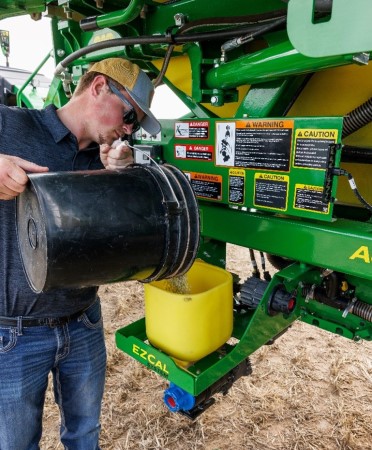 Calibrating with the industry exclusive EZCal System
 Color-coded hydraulic hose handles
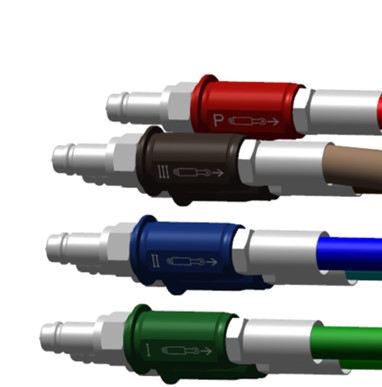 John Deere color-coded hydraulic hose handles
 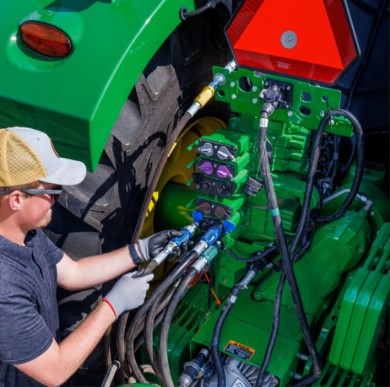 Color-coded hoses plugging into tractor SCV
 These color-coded aluminum hydraulic hose handles make connecting hydraulic hoses from the air seeder and air cart to the correct Selective Control Valve (SCV) on the tractor easier than before. The anti-slip makes it easy to grip the hose and connect or disconnect from the back of the tractor. Each color is laser engraved with the John Deere logo and extend/retract icons to ensure proper matching to the proper function.
- Easily identify function of each hose
- Consistently match hose handles colors to rear couplers on tractor
- Easy to grip for connecting or disconnecting to the SCV
- Base equipment on all trailing air carts
- Base equipment on all seeding tools
Experience 45 percent faster calibration with EZCal, setting a new standard in efficiency
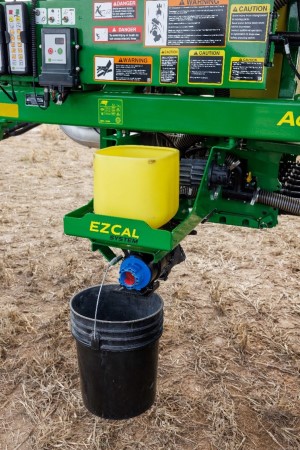 EZCal™ System on a C500L
 Overview
EZCal revolutionizes the calibration process for the C-Series Air Cart, offering unparalleled convenience and efficiency. By streamlining and automating calibration tasks, EZCal enables users to achieve precision at a remarkable 45% faster rate compared to leading competitors. This innovative system empowers farmers to optimize their operational efficiency, reduce downtime, and enhance overall productivity, setting a new standard for ease and speed in the calibration of agricultural equipment.
EZCal is like pressing the easy button on calibration. With EZCal, users can easily pour a bucket full of product into the hopper, select the roller color on the G5e cart side display, and initiate calibration. They can then proceed to tender the cart while the calibration process runs. Once completed, users can accept the MDV, seamlessly sending the data to the Gen 4 or G5 display, eliminating the need to remember numbers and reducing steps.
Please see the EZCal animation below for more information.
Benefits
- Enhanced Speed: EZCal accelerates the calibration process, providing a remarkable 45% decrease in calibration time compared to leading competitors, saving valuable time, and minimizing downtime.
- Maximize Productivity: Perform calibration with EZCal while tendering, enabling seamless multitasking and efficient utilization of operational resources.
- Improved Precision: By streamlining calibration tasks, EZCal ensures consistent and precise calibration, eliminating the need to manual weigh bags and input weights into the display.
- Simplified Process: EZCal simplifies the traditionally complex calibration process and automatically sends the MDV to the Gen4 or G5 display once accepted, making it more accessible and user-friendly for farmers, ultimately reducing the need for specialized expertise.
- Advanced Technology: EZCal represents a cutting-edge advancement in precision agriculture, setting a new standard for ease and speed in the calibration of agricultural equipment, and keeping farmers ahead in the evolving agricultural landscape.
- Unmatched Convenience: The EZCal System features all meter rollers stored on the side, offering the convenience of swift interchangeability during the calibration process.
Additional details
EZCal features an integrated load cell that automatically measures the initial and final weights of the hopper, enabling the calculation of the product distribution amount during calibration. Upon completion of the calibration, the measured weight is utilized to determine the meter displacement value (MDV), which is then seamlessly transmitted to the Gen 4 or G5 display in the cab, provided the farmer accepts the calibration.
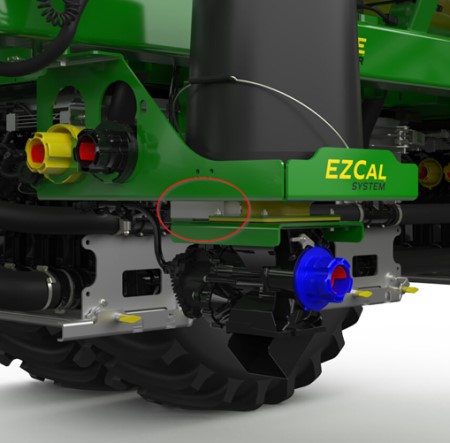 Built in load cell on EZCal System
 EZCal is controlled from the G5e cart side display, removing the requirement to repeatedly move between the cart and the cab during calibration. This streamlined process reduces numerous steps and eliminates the need to physically maneuver on the ground during calibration. With the G5e cart side display, users can easily calibrate one or multiple tanks simultaneously, selecting the desired meter roller for each tank.
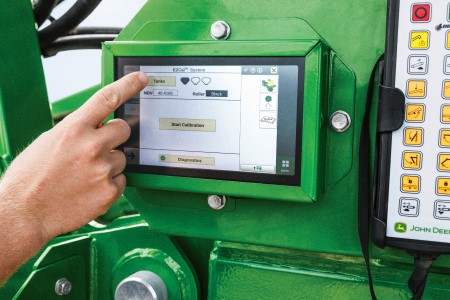 Operating EZCal from the G5e Cart Side display
 Improve seeding accuracy while reducing maintenance with the new AccuRate™ metering system
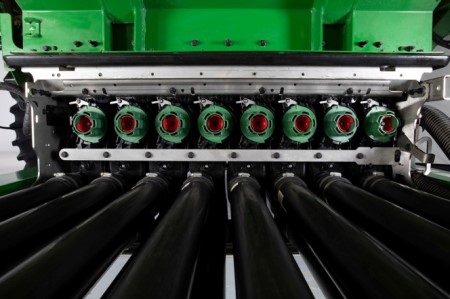 Individual electric stainless steel AccuRate metering system
 Overview
New for model year 2025 - the enhanced AccuRate™ metering system. This new technology brings a host of improvements, most notably a significant increase in seeding accuracy through the incorporation of individual electric meters per primary run. By introducing electric meters, John Deere empowers customers with more precise seeding capabilities across the entire width of the tool. This enhancement is made possible through a range of innovative features outlined in the benefits section.
The new AccuRate meters not only provide unparalleled accuracy, but also drastically reduce the maintenance required. To ensure maximum durability, the AccuRate metering system features a robust blend of stainless steel and composite materials. This combination guarantees a completely corrosion-resistant meter bank, providing customers with a reliable solution that stands the test of time.
Please see the AccuRate Meters animation below for more information
Benefits
- SectionCommand™ Pro – Effectively manage seed and fertilizer metering to reduce overlaps and skips by halting the rotation of each meter, thus preventing potential seed damage and spillage.
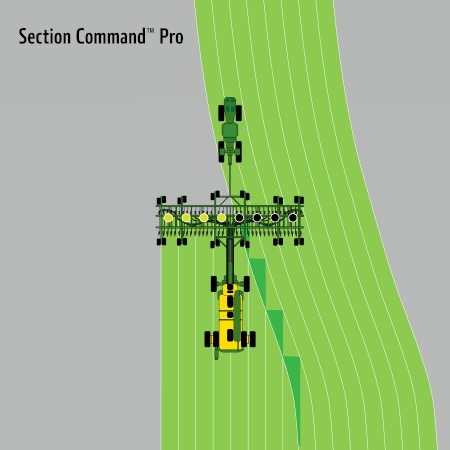 SectionCommand™ Pro illustration
 - Curve compensation – Guarantee precise product seeding across the entire drill by detecting tractor turns and making necessary adjustments to the metering outputs across each primary.
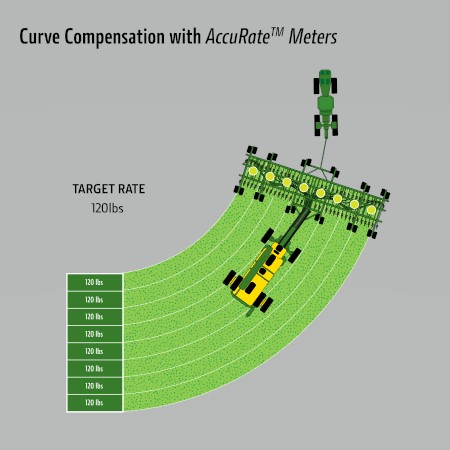 Curve Compensation with AccuRate Meters
 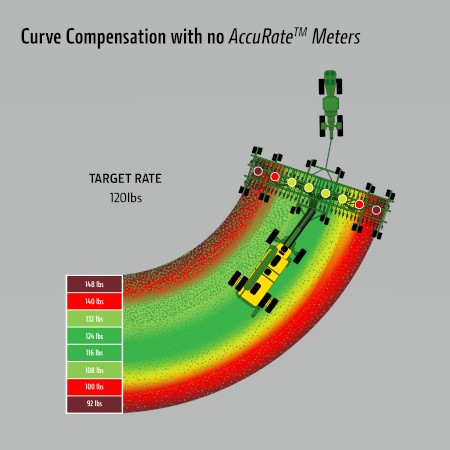 Curve Compensation with no AccuRate Meters
 - High fidelity prescriptions – Capability to adjust the speed and volume of product within each primary run, enabling precise customization of the desired product amount offering up to 8 times more precise on farm management.
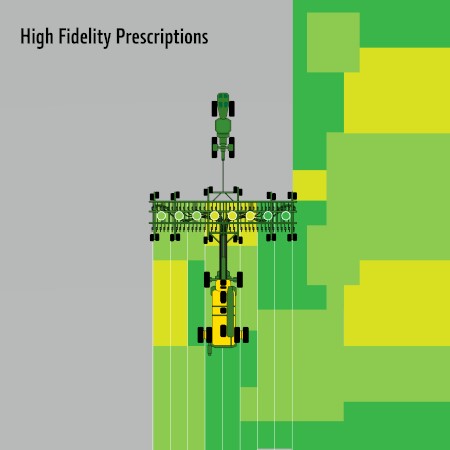 High Fidelity Prescription Illustration
 - Seed accurately on hills – Up to 8 percent more accurate seeding up and down hills compared to previous John Deere metering systems.
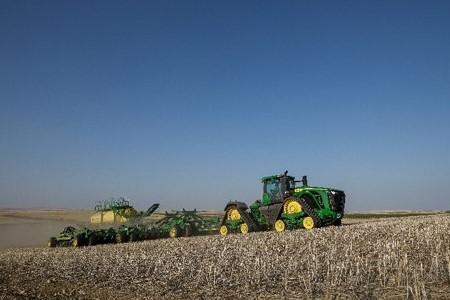 Air Seeding Train accurately seeding up a hill
 - Metering system with superior corrosion resistance – The stainless-steel meter housing combined with anti-static composite shoots forms a durable metering system designed to endure diverse abrasive commodities for an extended period. The anti-static composite shoots and primaries also help to minimize crop buildup. This helps provide consistent seed flow to your tools, driving accurate seeding rates
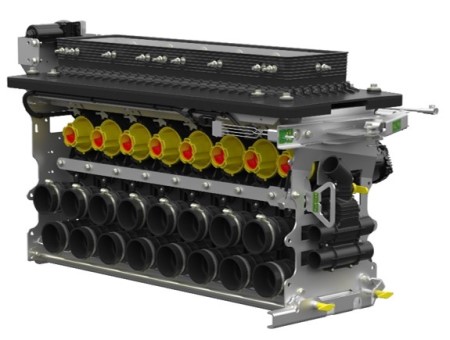 Stainless steel housing, anti-static composite shoots, and corrosion resistant hardware throughout the entire meter bank
 - Revised swing-open clean-out door – The newly engineered bottom clean-out door now swings completely open and effortlessly latches against the primaries, providing ample space for the hopper when emptying tanks.
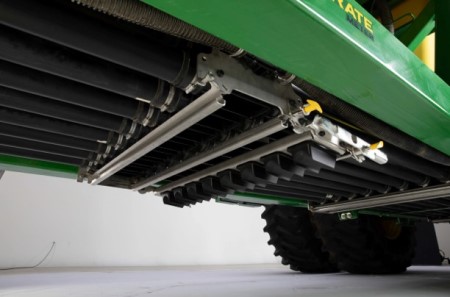 Clean-out door latched open for easy cleanout
 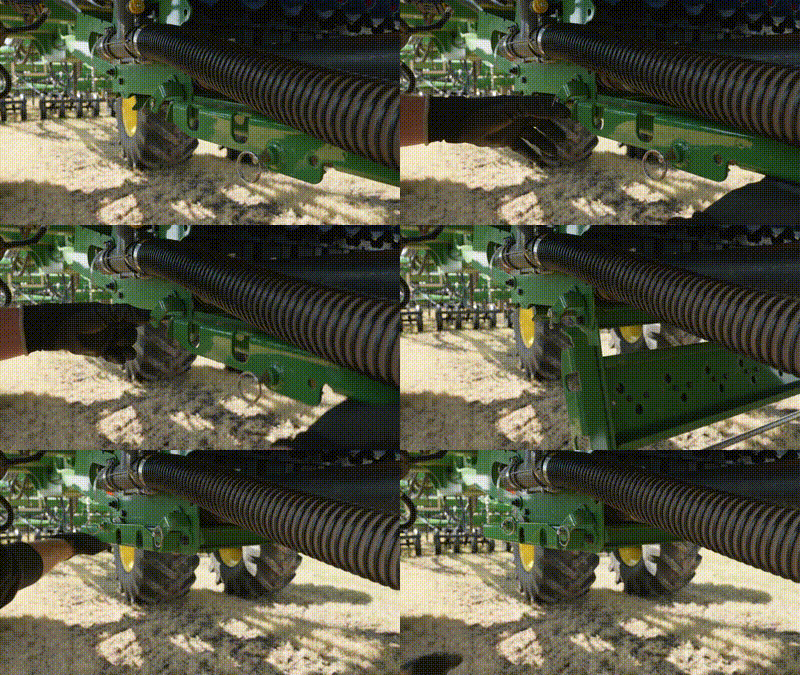 Closing swing out door
 - Ergonomic tank shutoff – Easily shut off the product flow from the tanks to the meters with the ergonomic tank shut off lever that uses a 5 to 1 mechanical advantage to close or open the gate.
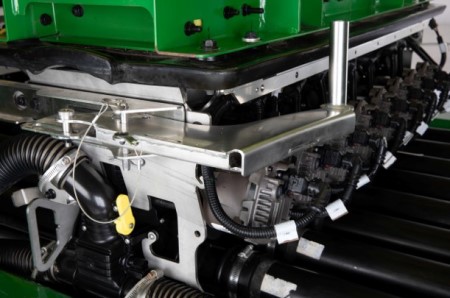 Ergonomic tank shutoff
 - Electric tank shutoff – With the flip of a switch easily open or close product flow to the tanks utilizing a 1500 lb actuator.
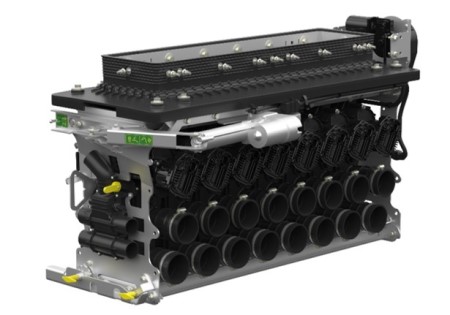 Electric tank shutoff actuator
 - Easy to use shoot selector – Newly designed ergonomic shoot selector that automatically adjusts the correct blower to pressurize the tank.
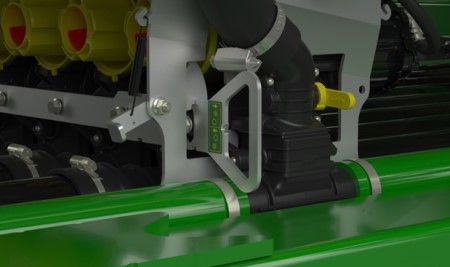 Shoot selector on a double shoot cart
 Updated anti-static composite shoots – Redesigned the anti-static composite shoot to have a larger opening allowing for large seeds to flow smoothly to the bottom shoot eliminating any potential plugging seen in the past.
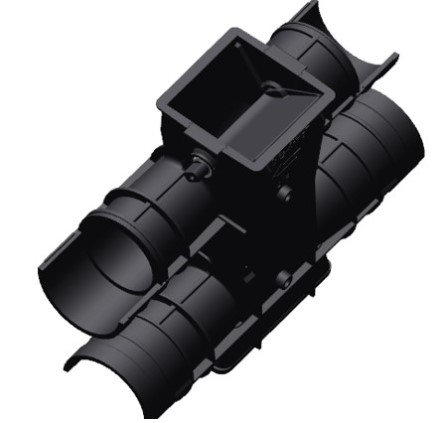 Anti-static composite shoot for a double shoot cart
 New agitator – Stainless steel agitator with brass bushings improves strength which allows for product to easily break up and flow into the anti-static composite shoots.
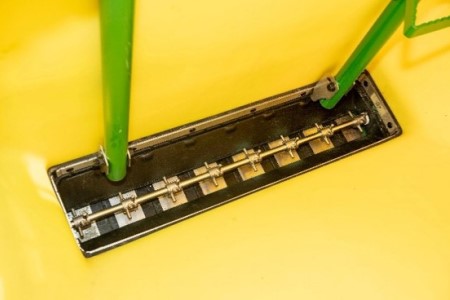 Agitator on 8 primary air cart
 Take command of every acre and every input with SectionCommand™ Pro
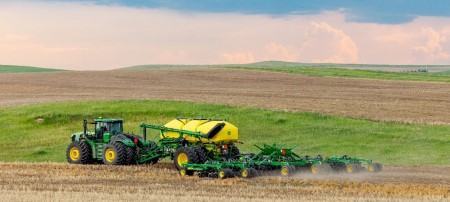 John Deere C-Series Air Cart running SectionCommand Pro
 SectionCommand Pro is an effective, integrated, exclusive John Deere solution that reduces costly overlaps and skips that can waste seed and fertilizer, while offering more consistent fields that improve the potential of your yield and your bottom line.
Thanks to the new AccuRate individual electric meter we can control commodity flow by maintaining the right application rates across each primary. All while eliminating potential seed damage and dumping effect by stopping the meter when each section is shut off. This helps stimulate even crop emergence during the growing season and promotes consistent crop maturity at harvest. SectionCommand Pro controls output from each meter on the cart.
Benefits
- Improved consistency of crop maturity at harvest
- Improved emergence consistency
- Reduced seed input cost
- Reduced fertilizer input cost
- Increased time between fills due to input savings
- Eliminating seed damage and seed dumping by shutting off the electric meter
SectionCommand Pro controls seed and fertilizer output by stopping and starting each meter with the electric motor. This ensures accurate metering across each meter section eliminating potential seed dumping or seed damage.
SectionCommand Pro illustration Section Control activation or subscription is required on the display to utilize any features of SectionCommand Pro. As with other John Deere Section Control products, a StarFire™ SF1 signal is the minimum level of accuracy recommended for operation. Please reference John Deere Section Control under Precision Ag Technologies for more information. The activation is included in the following.
- Gen 4 CommandCenter™ Premium activation
- 4640 Premium subscription
- Command Center and G5Plus Universal base feature set
- Optional permanent license on the G5 and G5 Universal display
Due to the varying lengths of product delivery hose used across the drill, SectionCommand Pro has a built-in equalizer feature to ensure consistent product delivery across the width of the drill when entering and exiting headlands. The software allows the producer to set the on/off product delivery times separately for the outermost opener and the innermost opener on the drill. Product delivery times are inputted for each tank on the cart, and the software creates a time delay for each individual electric meter.
Please see the SectionCommand Pro animation for more information.
Take precision to the next level with high fidelity prescriptions, offering 8 times the seeding accuracy
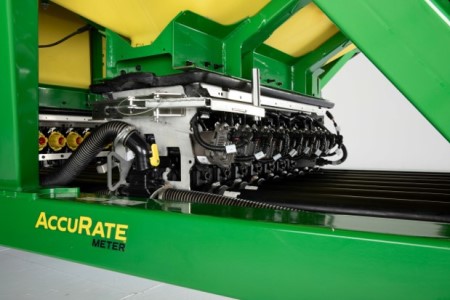 AccuRate™ individual electronic controlled meters enabling high fidelity prescriptions
 With input costs rising, it is increasingly important to manage inputs through variable rate application to manage cost and maximize crop potential. New for MY25, the AccuRate™ meters enable more precise control of inputs to achieve higher fidelity prescriptions for variable rate. With an individual electric meter per primary, the AccuRate meters can vary rate up to 8x more precisely than previous John Deere air carts. This allows you to place the correct rate down in each section, reducing overapplying when the width of the seeder is in multiple prescription zones.
Benefits
- Change the volume of product by each primary run allowing you to place the correct rate down in each section
- Reduce over and under applying rates for robust plants and a better opportunity for increased yield
- Manage, apply, and document your seeding prescriptions more precisely
- Better match your fertility rate at seeding to your soil nutrients and yield potential for added Nutrient Sufficiency
Model year 2024 and older models of John Deere air carts had limitations when it came to seeding prescriptions. The seeder could only apply a single rate across the entire width, even when in multiple different prescription rates. The default setting was to apply the rate from the highest zone across the entire width resulting in over applying in lower rate zones.
However, with the introduction of the AccuRate meters, this limitation has been overcome. The AccuRate meters have the capability to reduce the width of the zone rate by up to 8 times. This enhancement allows for a much closer match to the target rate specified in the prescription.
To give you a visual representation, below is a graphic illustrating the reduced zone widths on a P670 Precision Hoe Drill.
High Fidelity Prescription illustration Please see the high fidelity prescription animation for more information
Achieve seeding accuracy across your drill with curve compensation
Seeding in fields with obstacles such as terraces, waterways, and utility poles can pose difficulties. Traditional air carts using one-meter sections face limitations in varying the seeding rate across the seeder, resulting in uneven distribution when maneuvering around curves to avoid these difficulties. This disparity arises from the difference in distance covered between the inside and outside rows, causing overpopulation in the inside rows and underpopulation in the outside rows.
Fortunately, the challenge of uneven seeding on curves is effectively tackled by the curve compensation feature in the AccuRate™ meters. This feature ensures that each section of the seeder receives a unique signal based on the speed of the seeder, resulting in accurate seeding rates across the entire width of the seeder when going around curves. Thanks to this technology, farmers can achieve consistent and uniform seeding even when navigating curves in the field.
Curve compensation with AccuRate meters Curve compensation with no AccuRate meters Benefits
- Decreases overpopulation and underpopulation by 23 percent when seeding around curves*
- *NOTE: Disclaimer for an 80-ft drill with 8 sections seeding at 4.5 mph around a 150-ft curve radius.
- Ensures accurate seeding across the entire drill
- Improved consistency of crop maturity at harvest
- Improved consistency during emergence and growing season
- Reduce weed pressure by having proper canopying
Additional details
 Comparison of stand count improvement by positiont
  Comparison of stand count
 Hitting your target rate across the entire drill through curves has a direct impact on stand counts in the field. In a recent study conducted by John Deere, using curve compensation improved stand count on the inside of the curve by 5.1% and the outside of the curve by 11.7%. Furthermore, having curve compensation on through curves has shown to improve the difference in stand count between the inside and outside of the curve. With curve compensation on, the difference is 1.5%, compared to 8.4% when curve compensation is off. This study was conducted across five locations in 2025.
This stand count improvement matters because uniform plant density is the foundation for small-grain yield and weed control. Thin spots on the outside of curves leave sunlight and space that weeds can capture early, while thick spots on the outside can create uneven crop development. An even stand count helps:
- Protect yield potential with uniform stand counts
- Improve weed suppression with fewer thin spots in the field
- Reduces variability in crop maturity and simplifies crop protection and harvest timing
Please see the curve compensation animation for more information.
Blower speed automation
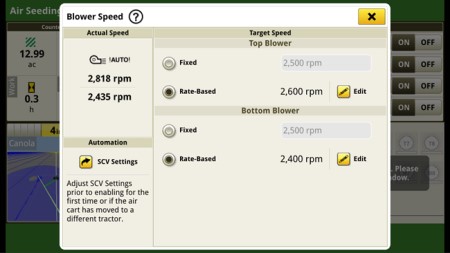 Blower Speed Automation Run Page on G5 Display
 Overview
No more manually adjusting hydraulic flow levels to chase your desired blower speed, set the blower speed for a given product application rate and forget it. John Deere blower speed automation maintains air cart blower speed within operator preset thresholds when C-Series Air Carts are operated with John Deere tractors*. The system adjusts hydraulic flow to maintain the blower speed as operating or environmental conditions change. You can preset target blower speeds for up to 6 product application rates on your Gen 4 or G5 display.
*Consult your dealer for compatibility details.
Benefits
- Avoid risk of blowing valuable seed or fertilizer out of the trench
- Prevent blockages by maintaining target blower speed at preset product rates
- Enables peace of mind for operator by setting target blower speed instead of flow rate
- Preset target blower speeds for up to 6 product application rates
John Deere Seeding cover crop solutions
Why cover crops?
With proper management and the right selection of cover crops, you can slow soil erosion, improve soil health, enhance water availability, suppress weeds, control pests and diseases, increase biodiversity, and reap numerous other benefits for your farm’s health and profitability. Cover crops act as a protective shield for the soil, reducing the impact of heavy rains and wind, which in turn minimizes topsoil loss. They improve soil structure by adding organic matter and fostering beneficial soil microorganisms, which enhances nutrient cycling and retention.
Additionally, cover crops can break up compacted soil layers, improving root penetration and water infiltration. By suppressing weeds, they reduce the need for chemical herbicides, leading to more sustainable farming practices. Cover crops also provide beneficial habitat for insects and pollinators, boosting on-farm biodiversity. Furthermore, they can help in sequestering carbon, contributing to climate change mitigation. Overall, integrating cover crops into your farming system can lead to more resilient and productive agricultural landscapes, ultimately enhancing long-term profitability.
What tool works best for you?
 N500C No-Till Air Drill
 The N500C model machines provide extensive crop compatibility, making them an excellent choice for customers looking to seed multiple crops and crop blends using a single tool. These machines can be customized with two unique rollers in multiple sizes to meet the specific needs of each operation. Refer to the crop compatibility link by roller below. Additionally, the N500C is capable of seeding in various soil conditions and residue types. Featuring the Pro-Series No-Till opener, it is designed to handle a wide range of conditions, from heavy residue to lightly worked soils. For more information, see the Sales Manual links below.
 1590 No-Till Box Drills
 Box Drills are an excellent choice for seeding cover crops, offering simplicity and high placement accuracy. Equipped with the Pro-Series No-Till opener, the 1590 Box Drill can handle a variety of conditions, from heavy residue to lightly worked soils. The 455 and BD11 Series Box Drills, featuring a double disk opener, are ideal for tilled seed beds. They also provide wider widths and a range of spacing options. For more information, see the Sales Manual link below.
Already have an Air Seeder?
 C-Series Air Cart tendering
 Any John Deere air cart compatible tools are excellent options for seeding cover crops. Air carts come with multiple tanks, enabling you to combine or blend your cover crop mixes effectively. With a wide range of meter roller options, air carts can be easily tailored to meet your specific cover crop needs and paired with the most suitable tool for the job. For more information, see the Sales Manual links below.