

6700A PrecisionCut™
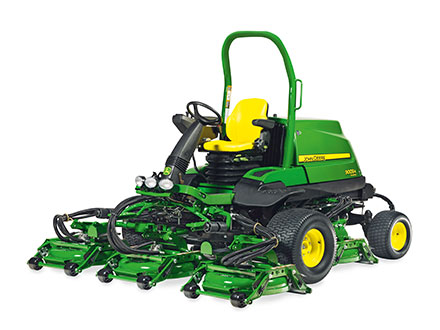
PrecisionCut™ Fairway Mower
- 18.2 kW (24.7 HP) FT4 compliant Liquid-Cooled Diesel Engine
- 55.9 cm (22 in) QA7 Cutting Units for a 254 cm (100 in) total Width of Cut
- 3-wheel, smooth tire configuration with standard GRIP All-Wheel Drive
- Passcode-protected TechControl display
Features
QA7 electric reel drive system meets customer needs for reduced hydraulic leaks, sound levels, and fuel consumption
 QA7 electric reel motor
 The electric reel design meets the largest customer needs:
- Eliminating 90% of the chances of an unsightly, damaging hydraulic leak by removing 150 leak points from the reel drive circuit
- Fuel Savings of up to 30% on the 7700A E-Cut™ Hybrid, and 21% on the 6700A E-Cut Hybrid, by mowing at reduced throttle minimizes operating costs
- Sound level reduction of up to 3dB(A) when mowing at reduced throttle opens up the operating window by being more friendly to neighbors
56-Volt, 240 amp Smart alternator and electric reel motors provide power for mowing, verticutting, and scalping
 Smart Alternator
 An innovative 56-volt, 240-amp alternator provides plenty of power for mowing, as well as more rigorous applications of scalping for overseeding and verticutting up to 1/4” (6.35 mm) deep.
- Belt driven from the engine, meaning no additional batteries required and less maintenance
- Integrates with LoadMatch™ by sensing load on the mowing system, and slowing traction speed to maintain cut quality when heavy loads are encountered
To handle the toughest loads that often come with Quick-Adjust 7 (QA7) applications, the reel motors have been updated compared to the QA7 design. The QA7 motors feature longer cooling fins for optimal cooling, and a larger internal bearing design.
QA7 Electric Reel Motor
18.4 kW (24.7 hp) Final Tier 4 (FT4) diesel engine offers plenty of power for mowing
 Diesel engine
  Diesel engine
 Power starts with the engine, and the 6500A and 6700A PrecisionCut™ and 6500A E-Cut™ Hybrid Fairway Mowers feature a 3-cylinder, 18.4-kW (24.7-hp ) diesel engine that has a strong reputation for power and performance. The engine is FT44 compliant, without the use of a diesel oxidation catalyst (DOC) or diesel particulate filter (DPF) to lower up-front acquisition costs.
The engine provides power for undulating conditions, while also being able to power fairway tender conditioners and rear roller power brushes while running any reel combination.
The air-intake system is also designed to pull clean air from the front of the machine behind the operator's seat, rather than dirty air from the rear of the machine. This improves engine performance and efficiency during those hot, dusty times of the year.
Three-wheel stance and smooth tyres for excellent maneuverability and after-cut appearance
 Smooth tyres
  Three-wheel stance
 The 6500A, and 6700A PrecisionCut™ and 6500A, and 8000A E-Cut™ Hybrid Fairway Mowers help to make fairways that look like greens a reality.
An innovative, smooth tyre design minimises compaction and tyre marking, especially in turns, giving a look similar to that from a riding greens mower. The GRIP all-wheel drive traction system works in combination with the smooth tyre design to give a greens-quality appearance without sacrificing traction.
These machines also excel at weight distribution, ensuring each tyre sees an equal amount of weight over a large tyre surface area for a ground pressure that is friendly to the surface of the turf.
This three-wheel stance is common with riding greens mowers in the market today. This provides an after-cut appearance that is so good it looks like the fairways were mowed by a greens mower. The three-wheel stance also excels in maneuverability, allowing for tight turning at the end of passes for increased productivity.
 Treaded tyre
 For those who prefer to use a treaded tyre rather than a smooth tyre, a fairway tread is also available through Parts.
TechControl display maximises performance and uptime by allowing more control in operation and diagnostics
 TechControl display
  Password-protected settings
 More control with the TechControl display with a large easy-to-read screen
Passcode-protected TechControl display enables quickly setting or changing mowing speed, turning speed, or transport speed to limit variations in performance by different operators.
 Mow setting screen
 Quickly adjust the mow or transport speed to make sure mow speed is what is needed for the changing conditions. The setting can be adjusted precisely using a speedometer app on a smartphone or global positioning system (GPS) device.
 Turn-speed setting screen
 Use the TechControl to slow the machine during turns while mowing and protect against turf scuffing and aggressive turning operators.
The turn speed control engages when in mow and the cutting units are lifted for turns. Once the turn is made and the cutting units are lowered, the machine speed returns to the set mow speed.
The turn speed is a percentage of mow speed. When set to 100 percent, turn speed control is off or allows 100 percent of the mow speed in turns. Turn speed setting of 50 percent allows only 50 percent of the set mow speed to be reached during turns.
Here is an example:
Mow speed = 9.66 km/h (6 mph)
Turn speed set at 50 percent
Maximum turning speed will be 4.83 km/h (3 mph)
 Input/output screen
  Service timers screen
 The A-model PrecisionCut™ Mowers, E-Cut™ Hybrid Mowers, and TerrainCut™ Mowers have the latest in advanced diagnostics through the TechControl display. Most all diagnostics are performed while sitting in the operator’s seat.
The TechControl has onboard visual diagnostics allowing quick and easy machine diagnostics, maximising up time. The system allows technician to see inputs and outputs of the electrical system. Also, the technician can see stored controller codes on the machine to aide in troubleshooting incidents that may have occurred while on the course.
The TechControl will also display the notification for maintenance of the hydraulic and engine oils using service timers to notify when it has reached the time to perform the required service.
 Language settings
 Choose from a list of several languages to use for the TechControl.
Operator warning notifications are incorporated into the TechControl and will alert the operator if a problem arises during operation.
Description |
Hydraulic over temp |
Hydraulic oil filter restriction |
Engine oil pressure low |
Engine coolant temperature |
Reel motor |
Battery voltage |
GRIP all-wheel drive traction system moves flow from wheels that slip to those that grip
 Rear wheel motor
 The standard GRIP all-wheel drive traction system transfers hydraulic flow from wheels that slip to wheels that grip. For example, if the right front wheel starts to slip, hydraulic flow goes to the left front and rear tires to maintain traction power. This helps provide maximum traction in undulating conditions.
The GRIP all-wheel drive traction system is standard equipment with the 6500A, and 6700A PrecisionCut™ and 6500A E-Cut™ Hybrid Fairway Mowers and is also engaged at all times, whether in mow or in transport. A check valve in the rear motor puts the machine in two-wheel drive (2WD) in reverse to minimise any potential scuffing.
JDLink™ connectivity offers near real-time machine data
John Deere ride-on golf equipment and the 185/225 E-Cut™ Electric Walk Greens Mower utilize a JDLink™ modem to harness data off the machine. The modem relays this information via a cellular network to the John Deere Operations Center™. Golf course superintendents and field managers have access to this vast amount of information that they can use to make more informed decisions on their properties.
 (JDLink™ M Modem)
  (JDlink™ R Modem)
 Some examples of the available machine information and other features through the John Deere Operations Center™ include:
- Maps with current location, engine hours, and fuel level
- Location history
- Machine Analyzer for full fleet usage statistics
- Diagnostic Trouble Codes (DTC) notifications
- Geofencing and curfews
 (Operations Center machine information)
 Accessing this data couldn’t be easier. Simply log in to Operationscenter.deere.com through a desktop web browser and enable JDLink connectivity. The John Deere Operations Center™ Mobile application on your mobile device can also be used to see all of this data. For more information on connected features and other golf course management solutions please reference the Golf and Sports Turf Solutions page in the Sales Manual